Server Types
Minepanel supports both Java Edition and Bedrock Edition servers.
Server Editions
| Edition | Image | Default Port | Protocol | Proxy Support |
|---|---|---|---|---|
| Java | itzg/minecraft-server | 25565 | TCP | Yes (mc-router) |
| Bedrock | itzg/minecraft-bedrock-server | 19132 | UDP | No |
How It Works
Minepanel uses Docker images from itzg. When you create a server, it generates the appropriate Docker configuration automatically.
Documentation
- Java: docker-minecraft-server docs
- Bedrock: minecraft-bedrock-server docs
Bedrock Edition
Minecraft Bedrock Edition server for cross-platform play (Windows 10/11, Xbox, PlayStation, Switch, iOS, Android).
Basic Setup
- Select Bedrock as server edition
- Choose version (LATEST, PREVIEW, or specific)
- Configure settings
Configuration Options
| Option | Variable | Description | Default |
|---|---|---|---|
| Version | VERSION | Server version | LATEST |
| Server Name | SERVER_NAME | Server display name | Dedicated Server |
| Gamemode | GAMEMODE | survival, creative, adventure | survival |
| Difficulty | DIFFICULTY | peaceful, easy, normal, hard | easy |
| Allow Cheats | ALLOW_CHEATS | Enable cheats | false |
| Max Players | MAX_PLAYERS | Maximum players | 10 |
| View Distance | VIEW_DISTANCE | Render distance | 32 |
| Tick Distance | TICK_DISTANCE | Simulation distance | 4 |
| Online Mode | ONLINE_MODE | Xbox Live auth required | true |
| White List | WHITE_LIST | Enable whitelist | false |
Example Configuration
environment:
  EULA: 'TRUE'
  VERSION: LATEST
  SERVER_NAME: 'My Bedrock Server'
  GAMEMODE: survival
  DIFFICULTY: normal
  MAX_PLAYERS: 20
ALLOW_CHEATS: 'false'Permissions (XUIDs)
Bedrock uses Xbox User IDs (XUIDs) for permissions:
# Operators
-e OPS="1234567890,0987654321"

# Members
-e MEMBERS="1234567890"

# Visitors
-e VISITORS="1234567890"Finding XUIDs
Player XUIDs are logged when they join the server. You can also use online XUID lookup tools.
Allowlist
# Enable allowlist with specific players
-e ALLOW_LIST=true
-e ALLOW_LIST_USERS="player1:1234567890,player2:0987654321"Commands
Bedrock doesn't support RCON. Commands are executed via send-command:
docker exec CONTAINER_NAME send-command gamerule dofiretick falseCommand Output
Command output appears in server logs, not as a direct response. Check the Logs tab after executing commands.
Java Edition
World Sources (Folders/ZIP/TAR)
Minepanel includes world source management in General -> World for Java servers. It uses WORLD, LEVEL, and FORCE_WORLD_COPY from itzg/docker-minecraft-server.
- Local world sources per server:
servers/<server-id>/worlds/ - Global world library shared by all servers:
servers/.world/worlds/ - Supported sources:
- Folder containing
level.dat - Archive files:
.zip,.tar,.tar.gz,.tgz
- Folder containing
- The panel checks if the target level was already copied by looking for:
servers/<server-id>/mc-data/<LEVEL>/level.dat
When a world is selected from General -> World, Minepanel updates compose config and restarts the server automatically if it is running.
You can classify worlds using subfolders (for example minigames/, skyblock/, modded/) in both local and global libraries.
World Library also includes a Discover Worlds panel:
- Search worlds in CurseForge from the UI and import them into the global library
- Import world archives from direct HTTPS URLs (
.zip,.tar,.tar.gz,.tgz) - Imported files are stored under
servers/.world/worlds/curseforge/orservers/.world/worlds/url/
World Type (level-type)
The world type is set in General -> World via LEVEL_TYPE. Besides the standard presets (default, flat, large biomes, amplified, single biome surface), Java servers offer a Custom option to enter any level-type provided by a mod or modpack.
This is required for modpacks with their own world generation. For example, ATM10 To The Sky needs skyblockbuilder:skyblock; without it the itzg/docker-minecraft-server image rewrites server.properties on every start and the world regenerates as normal.
For CurseForge modpacks that ship a prebuilt world (To The Sky packs), you can also use CF_SET_LEVEL_FROM (WORLD_FILE or OVERRIDES) under the CurseForge advanced options so the modpack's bundled world is used.
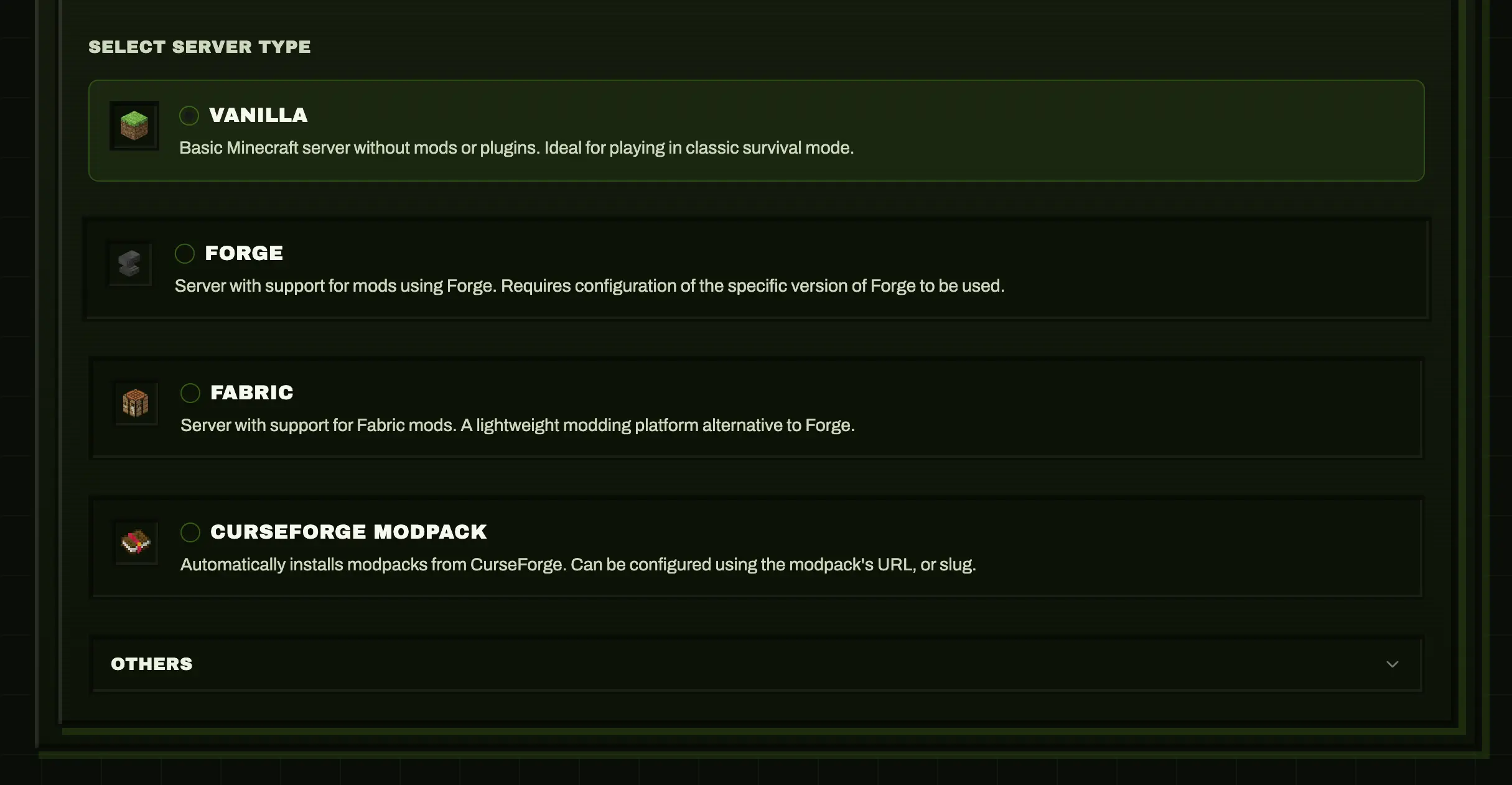
Vanilla
Basic Minecraft server without mods or plugins.
environment:
  TYPE: VANILLA
VERSION: 1.21.4Fabric
A lightweight modding platform alternative to Forge.
Basic Setup
- Select Fabric as server type
- Choose your Minecraft version
- Optionally specify loader/launcher versions
Configuration Options
| Option | Variable | Description | Default |
|---|---|---|---|
| Loader Version | FABRIC_LOADER_VERSION | Fabric loader version | Latest |
| Launcher Version | FABRIC_LAUNCHER_VERSION | Fabric launcher version | Latest |
| Custom Launcher | FABRIC_LAUNCHER | Path to custom launcher jar | - |
| Launcher URL | FABRIC_LAUNCHER_URL | URL to custom launcher | - |
| Force Reinstall | FABRIC_FORCE_REINSTALL | Re-install if corrupted | false |
Example Configuration
environment:
  TYPE: FABRIC
  VERSION: 1.21.4
  FABRIC_LOADER_VERSION: 0.13.1
FABRIC_LAUNCHER_VERSION: 0.10.2Fabric API
Most Fabric mods require the Fabric API mod. Install it easily using Modrinth.
Forge
The most popular mod loader with extensive mod compatibility.
Configuration Options
| Option | Variable | Description | Default |
|---|---|---|---|
| Forge Version | FORGE_VERSION | Forge build number | Latest for version |
Example
environment:
  TYPE: FORGE
  VERSION: 1.20.4
FORGE_VERSION: 43.2.0Neoforge
A free, open-source, community-oriented modding API for Minecraft.
Configuration Options
| Option | Variable | Description | Default |
|---|---|---|---|
| Neoforge Version | NEOFORGE_VERSION | Neoforge build number | Latest for version |
Example
environment:
  TYPE: NEOFORGE
  VERSION: 1.21.1
NEOFORGE_VERSION: 21.1.219Paper
High-performance Spigot fork with plugins support.
Configuration Options
| Option | Variable | Description | Default |
|---|---|---|---|
| Build | PAPER_BUILD | Specific Paper build | Latest |
| Channel | PAPER_CHANNEL | Release channel | default |
| Download URL | PAPER_DOWNLOAD_URL | Custom download URL | - |
Example
environment:
  TYPE: PAPER
  VERSION: 1.21.4
PAPER_BUILD: 120Spigot
Popular plugin-based server.
Configuration Options
| Option | Variable | Description | Default |
|---|---|---|---|
| Download URL | SPIGOT_DOWNLOAD_URL | Custom download URL | - |
| Build from Source | BUILD_FROM_SOURCE | Compile from source | false |
Example
environment:
  TYPE: SPIGOT
VERSION: 1.20.4Bukkit
The original plugin platform.
Configuration Options
| Option | Variable | Description | Default |
|---|---|---|---|
| Download URL | BUKKIT_DOWNLOAD_URL | Custom download URL | - |
| Build from Source | BUILD_FROM_SOURCE | Compile from source | false |
Purpur
Fork of Paper with additional features.
Configuration Options
| Option | Variable | Description | Default |
|---|---|---|---|
| Build | PURPUR_BUILD | Specific Purpur build | Latest |
| Download URL | PURPUR_DOWNLOAD_URL | Custom download URL | - |
| Flare Flags | USE_FLARE_FLAGS | Use Flare performance flags | false |
Pufferfish
Paper fork focused on performance.
Configuration Options
| Option | Variable | Description | Default |
|---|---|---|---|
| Build | PUFFERFISH_BUILD | Specific build | Latest |
| Flare Flags | USE_FLARE_FLAGS | Use Flare flags | false |
Folia
Experimental multi-threaded Paper fork.
Configuration Options
| Option | Variable | Description | Default |
|---|---|---|---|
| Build | FOLIA_BUILD | Specific build | Latest |
| Channel | FOLIA_CHANNEL | Release channel | default |
| Download URL | FOLIA_DOWNLOAD_URL | Custom URL | - |
Leaf
Another Paper fork with optimizations.
Configuration Options
| Option | Variable | Description | Default |
|---|---|---|---|
| Build | LEAF_BUILD | Specific build | Latest |
Modrinth Modpacks
Install complete modpacks from Modrinth.
Installation Methods
1. Slug:
environment:
  TYPE: MODRINTH
MODRINTH_MODPACK: surface-living2. URL:
environment:
  TYPE: MODRINTH
MODRINTH_MODPACK: https://modrinth.com/modpack/surface-living2. URL (with version locking):
environment:
  TYPE: MODRINTH
MODRINTH_MODPACK: https://modrinth.com/modpack/surface-living/version/1.2.1GT New Horizons (GTNH)
Install GT New Horizons using the dedicated GTNH server type.
Recommended defaults in Minepanel
TYPE=GTNHGTNH_PACK_VERSION=2.8.1GTNH_DELETE_BACKUPS=falseSKIP_GTNH_UPDATE_CHECK=falseLEVEL_TYPE=rwgDIFFICULTY=hardALLOW_FLIGHT=trueENABLE_COMMAND_BLOCK=true
GTNH options
| Option | Variable | Description | Default |
|---|---|---|---|
| Pack Version | GTNH_PACK_VERSION | latest, latest-dev, or a fixed version like 2.8.1 | 2.8.1 |
| Delete Backups | GTNH_DELETE_BACKUPS | Remove config backup folders created during upgrades | false |
| Skip Update Check | SKIP_GTNH_UPDATE_CHECK | Skip the GTNH update/install check after first install | false |
Notes
- GTNH targets Minecraft
1.7.10 - Java
17+is recommended java25is preferred for GTNH2.8.0+- Enable
SKIP_GTNH_UPDATE_CHECKonly after the initial install if you want to freeze updates
CurseForge Modpacks
Install complete modpacks from CurseForge.
API Key Required
You need a CurseForge API key. Get one from CurseForge for Studios.
Installation Methods
1. URL Method (easiest):
environment:
  TYPE: AUTO_CURSEFORGE
  CF_API_KEY: your_key
CF_PAGE_URL: https://www.curseforge.com/minecraft/modpacks/all-the-mods-9/download/54649882. Slug + File ID:
environment:
  TYPE: AUTO_CURSEFORGE
  CF_API_KEY: your_key
  CF_SLUG: all-the-mods-9
CF_FILE_ID: 54649883. Auto-select latest:
environment:
  TYPE: AUTO_CURSEFORGE
  CF_API_KEY: your_key
CF_SLUG: all-the-mods-9Advanced Options
| Option | Variable | Description | Default |
|---|---|---|---|
| Force Sync | CF_FORCE_SYNCHRONIZE | Re-download even if exists | false |
| Parallel Downloads | CF_PARALLEL_DOWNLOADS | Concurrent downloads | 4 |
| Skip Existing | CF_OVERRIDES_SKIP_EXISTING | Don't overwrite files | false |
| Set Level From | CF_SET_LEVEL_FROM | World source: WORLD_FILE, OVERRIDES | - |
| Force Include | CF_FORCE_INCLUDE_MODS | Force download specific mods | - |
| Exclude Mods | CF_EXCLUDE_MODS | Exclude specific mods | - |
Feed The Beast (FTBA)
Install Feed The Beast modpacks using the dedicated FTBA server type. The pack pins its own Minecraft and mod loader version, so you don't set a Minecraft version manually. No CurseForge API key is required.
Installation Methods
1. Latest version:
environment:
  TYPE: FTBA
FTB_MODPACK_ID: 1192. Locked to a specific version:
environment:
  TYPE: FTBA
  FTB_MODPACK_ID: 119
FTB_MODPACK_VERSION_ID: 12179FTBA options
| Option | Variable | Description | Default |
|---|---|---|---|
| Modpack ID | FTB_MODPACK_ID | Numeric modpack ID from the pack page on feed-the-beast.com | required |
| Modpack Version ID | FTB_MODPACK_VERSION_ID | Numeric version ID; omit to always install the latest | latest |
Notes
- Find the modpack ID on the pack's page at feed-the-beast.com
- Leave
FTB_MODPACK_VERSION_IDempty to always install the latest available version
Server Type Categories
| Category | Types | Use Case |
|---|---|---|
| 🟡 Bedrock | BEDROCK | Cross-platform (consoles, mobile, Windows 10/11) |
| 🟢 Vanilla | VANILLA | Pure Minecraft Java, no modifications |
| 🔵 Mod Loaders | Forge, Neoforge, Fabric | Client-side mods required |
| 🟣 Plugin Servers | Paper, Spigot, Purpur, Pufferfish, Folia | Server-side plugins, vanilla clients |
| 🟠 Modpacks | AUTO_CURSEFORGE, Modrinth, GTNH, FTBA | Pre-configured mod collections |
Next Steps
- Learn about Mods & Plugins Management
- See all Configuration Options
External Resources
Java Edition:
- docker-minecraft-server Docs - Full environment variables reference
- Server Types Reference - All supported server types
- Mod Platforms - Modrinth, CurseForge, Spiget integration
Bedrock Edition:
- minecraft-bedrock-server GitHub - Bedrock server image
- Bedrock Server Properties - All configuration options